


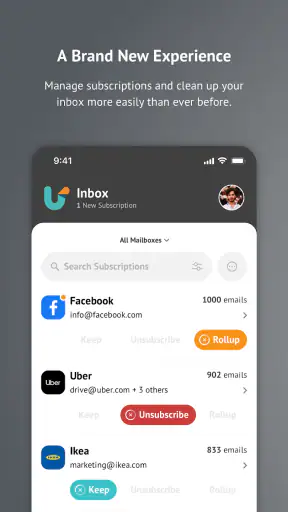
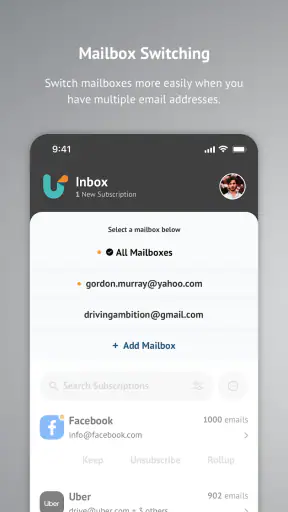
Most inbox-cleaning tools ask me to become more organized. Unroll.Me takes a more direct approach: it helps me deal with unwanted subscription email by identifying messages that belong to mailing lists and giving me a simpler way to decide what should stay, what should go, and what can be grouped together. That focus makes it different from a normal email client, where promotional mail usually remains mixed with work, receipts, personal conversations, and important alerts.
I reviewed it as a free productivity app from Unroll.Me, designed for Android users who feel that their inbox is being filled by newsletters and recurring promotions. It is rated for Everyone, works on devices running Android 8.0 or later, and the current version is 3.3.30. The app has built a substantial audience, with an average rating of 4.5 from around 92 thousand ratings and more than a million installs. Those figures suggest that the basic problem it addresses is familiar: many people do not need another email account, but they do need less noise in the one they already use.
Turning subscription clutter into a decision
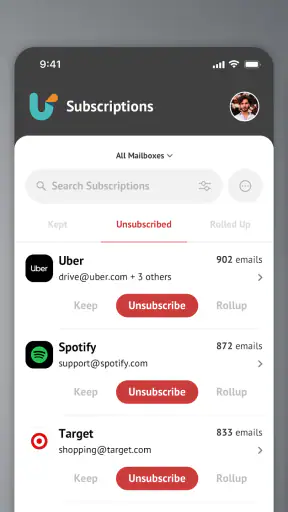
The most useful capability here is not simply deleting old messages. It is separating recurring subscription mail from the rest of the inbox so I can make decisions at the source of the clutter. That distinction matters because deleting one promotional message rarely solves anything. The next message arrives later, followed by another, and the inbox slowly returns to the same state.
In practice, the app is most valuable when I treat it as a cleanup session rather than as a replacement for my regular email app. I still want my usual inbox for conversations, attachments, account notices, and messages that require a reply. Unroll.Me is better understood as a focused layer for handling mailing-list overload. Its purpose is to reduce the number of recurring senders competing for attention.
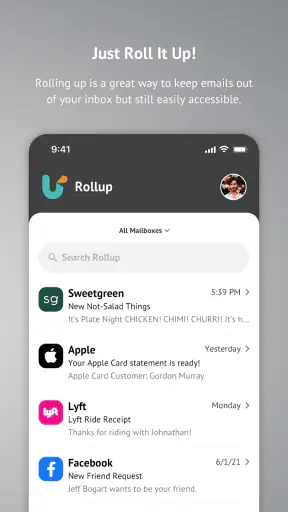
The app’s name points to its central idea: instead of opening each newsletter separately, I can review subscription-related mail in a more concentrated way. That changes the mental task. Rather than asking, “Should I read this message right now?” I can ask, “Do I want to keep receiving this type of message at all?” That is a much better question when the real problem is repetition.
The important benefit is not a cleaner screen for one afternoon; it is fewer low-value messages arriving afterward. This is why the app makes more sense for people who have accumulated years of retail offers, newsletters, app updates, event announcements, and other recurring mail. If the inbox is already tidy, the benefit will naturally feel smaller.
What the workflow feels like
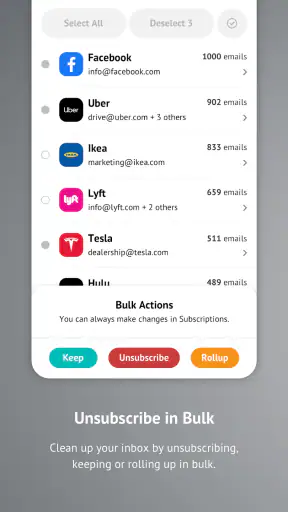
When I use the app, I approach the process in batches. I look at the subscriptions it presents and decide which ones still deserve space in my day. A sender I once found useful may now be irrelevant. A store I bought from once may still be sending frequent offers. A newsletter may contain good information, but not enough value to justify the attention it demands.
This batch approach is more efficient than hunting through a conventional inbox with search terms such as “unsubscribe” or “sale.” Manual searching can find individual messages, but it does not always give me a clear view of the broader pattern. A dedicated cleaner makes the recurring nature of the problem easier to see.
I also find that the app encourages a more deliberate cleanup habit. Instead of deleting messages whenever they become annoying, I can review subscriptions together and make consistent choices. That is a small design advantage, but it helps prevent the common cycle of ignoring clutter until the inbox becomes stressful again.
Users wondering whether this replaces Gmail, Outlook, or another mail client should think of it as a companion rather than a full substitute. It is not where I would want to write long replies, manage a complicated work thread, or search an old attachment every day. Its strength is the narrow job of reducing subscription mail. For everyday communication, the usual email app remains the better home.
A realistic everyday example
Imagine checking email on a Monday morning and seeing a mixture of a delivery update, a message from a colleague, a bank alert, three retail promotions, two newsletters, and a recurring notice from a service you rarely use. In a standard inbox, every item has the same visual opportunity to interrupt you. Even if the important messages are easy to recognize, the promotional items still consume attention.
With Unroll.Me, I would use a separate cleanup moment to review those recurring senders instead of handling them one by one during the workday. I might keep a newsletter I genuinely read, remove a retailer whose messages I never open, and block unwanted spam rather than allowing it to remain part of the usual flow. The practical result is not that every email disappears. It is that future inbox checks contain fewer decisions that have nothing to do with my priorities.
That workflow is especially helpful for someone who signs up for discounts, downloads, trials, events, or online services frequently. Each signup can create another stream of mail, and the accumulation is easy to miss because no single message seems serious. The app gives that accumulation a visible target.
Where the cleaner saves the most time
The hidden advantage is decision compression. I do not have to remember which senders have been bothering me over the last several weeks. I can make the decision while the subscription is in front of me. This is more useful than it sounds because inbox fatigue often comes from repeated small choices, not from one enormous backlog.
Another useful insight is that cleanup should begin with senders I never recognize or never open, not with messages I occasionally read. Removing borderline subscriptions too aggressively can make an inbox quieter but less useful. I prefer to preserve sources that provide information I actively seek and remove sources that depend on impulse or habit. The app supports that kind of prioritization by making the subscription list itself the object of review.
A third practical tip is to use the service before an especially busy period, such as a new job, a move, or a demanding study schedule. Reducing promotional mail before that period is more effective than waiting until every spare minute is already being consumed by inbox maintenance. The app is not a productivity system for every task, but it can remove one recurring source of distraction before it grows.
Blocking spam versus managing subscriptions
It is useful to distinguish unwanted subscription mail from genuine spam. A newsletter I knowingly joined is different from an unsolicited message, even if I do not want either one. The app’s focus on unsubscribing and blocking spam is helpful because those problems often appear together, but I would still make decisions carefully rather than treating every unfamiliar sender as malicious.
For sensitive messages, I would verify the sender and the context before taking action. A legitimate account alert can look promotional, and a message that appears harmless can still deserve caution. The app can help organize the inbox, but it should not replace ordinary judgment about financial notices, security warnings, or services I actively use.
The tradeoff: convenience requires trust
Any tool that helps manage email needs access to enough information to identify the messages it is working with. That creates a tradeoff I would take seriously. The convenience of a cleaner subscription view is valuable, but I would still read the app’s current privacy and account-access explanations before connecting an important inbox. This is not a reason to dismiss the product; it is a reason to understand what I am authorizing.
People who handle confidential work correspondence may prefer to keep cleanup manual or use controls built directly into their email provider. The same is true for anyone who is uncomfortable giving a separate service a role in managing their mailbox. In that situation, the convenience may not justify the extra layer, even if the app’s purpose is appealing.
There is also a risk of over-cleaning. Subscription mail is not automatically useless. Some mailing lists contain receipts, product notices, professional information, or reminders that I would regret losing. I would therefore review the sender and the kind of message involved before removing it. A quieter inbox is only an improvement if it remains reliable.
Another limitation is that the app’s value depends on how much subscription clutter exists in the first place. If most of my unwanted mail comes from individual senders, old conversations, large attachments, or poorly organized folders, this is not the ideal tool. A storage-management feature, inbox search, or built-in provider filter could be more appropriate for those problems.
How it compares with ordinary email cleanup
Manual cleanup gives me maximum control. I can search, inspect each message, create filters, and decide exactly what happens. That approach is better for users who enjoy configuring rules or who need precise control over business correspondence. Its weakness is effort: it takes time, and many people postpone it until the inbox is already difficult to manage.
Built-in unsubscribe controls are often enough when I only need to leave one mailing list. They are the sensible choice for a small, occasional problem because I do not need another app for a single sender. Unroll.Me becomes more compelling when the problem is broad and repetitive, with many subscriptions competing for attention.
Full-featured email clients are stronger for communication, scheduling, searching, and account management. They may be the better choice for a professional mailbox where cleanup must happen alongside replies and document handling. Unroll.Me is more focused, and that focus is both its advantage and its boundary. It does less than a complete email client, but it can make one neglected part of email maintenance easier to confront.
Who gains the most from using it
I would recommend it most to people whose inbox has become a record of every online purchase, discount signup, newsletter subscription, and service registration they have made. It is also a good fit for users who know they should unsubscribe but keep postponing the work because opening each message feels tedious.
Frequent online shoppers may see the quickest improvement, especially if promotional mail has become mixed with delivery notices and receipts. Students and busy professionals can also benefit when they need to reduce distractions without spending an evening designing complicated filters. The app’s Everyone content rating and free price make it easy to consider, although the more important question is whether its focused approach matches the kind of clutter in the inbox.
I would be more cautious about recommending it to someone with a very small inbox, a highly confidential work account, or a mailbox whose main problems are attachments and storage. I would also skip it if I prefer to control every filtering rule myself. In those cases, the email provider’s own tools may be simpler and more transparent.
What to do before and after cleanup
Before starting, I would think about the senders I genuinely want to keep. That short mental list prevents the cleanup from becoming an indiscriminate purge. I would also separate useful transactional mail from marketing mail in my own judgment, since a message from a service I use may matter even when it looks repetitive.
After making the first round of decisions, I would return to the regular email app and check whether important messages are still easy to find. If the inbox feels quieter but a receipt, reminder, or account notice has become harder to locate, I would adjust my choices rather than assuming more removal is always better.
The best long-term habit is to treat the app as a periodic reset, not as permission to sign up for every mailing list without consequences. It can reduce accumulated clutter, but it cannot prevent every future subscription. Pairing cleanup with more selective signups is what keeps the result useful.
My final view
Unroll.Me - Inbox Mail Cleaner succeeds because it concentrates on a specific frustration: recurring email that continues arriving long after its value has faded. I like the way it turns a vague feeling of inbox overload into a manageable review of subscriptions. The experience is most convincing when I have many promotional or newsletter senders and want to make several decisions in one focused session.
It is not the right answer for every email problem, and I would not use it as my main communication app. Trust, careful review, and the possibility of removing something useful are real considerations. Still, for the person who keeps deleting the same kind of message without addressing why it returns, this productivity app offers a more lasting approach.
My recommendation is straightforward: try it if subscription clutter is the main reason your inbox feels noisy, and begin with a cautious review rather than removing everything at once. If your email needs are broader, manual filters or your provider’s built-in controls may serve you better. But when the goal is to regain attention from a crowded stream of recurring mail, this focused tool earns a place in the cleanup routine.


